The Fully Illustrated Blog

iPad sketch number 3

April 21, 2010

Hey Everyone,

Nice morning, the sun was shining and birds were singing, and all the while, my 3 month old son was fast asleep on my chest as my wife got ready for the day.  During which time I grabbed the iPad and thought I’d see what can be created in the time it takes a women to get ready in the morning…but I only got 40 mins ;)

firemonster

This firery monstery thing just seemed to flow from my fingers, so I went with it, kinda fun.  Again, it aint that great, as with all the other sketches so far, but I’m starting to see a level of freedom and movement in these peices that gets lost in vectors, so I’m keener than ever to persue this device and see where it takes me.  I think in many ways its actually going to broaden my skill set rather than anything else, and that can only be a good thing.

Hope you like him.

Mike.

P.S.  I’ve ordered a Pogo Sketch, so once that get here from the US, I’ll throw another one of these images together and write a quick review…presuming the Pogo Sketch is better than the cheaper alternatives on eBay that is ;)

Categories: Concept Art,Fully Illustrated,Sketch Work,Sketchbook Pro,iPad

The iPad, sheer awesomeness!

April 9, 2010

ipad01

Its official, I’m head over heels in love!  This shiny oversized iPhone is absolutely breathtaking in just about every respect!  I’m bowled over!
Ok, onto the good stuff, the sketching and painting:
Initially, the whole prospect of painting with my fingers seemed way too primitive and all too clumsy, and in truth, it kind of is, but after only 50 mins playing, I soon realised that you can adapt (a bad workman always blames his tools n’all that), and I think that with practice I could achieve results that I would be ‘officially’ happy with.  Don’t get me wrong, I’m not going to be creating final project work with this, it just wouldn’t give me the vector precision that I love, but for roughs, samples and experiments, its perfect.
As this is multi-touch, you can zoom in and out VERY easily and very quickly, meaning that the clumsiness of the finger painting soon becomes an obstacle that you can overcome (to a degree), as you simply drop your brush size and zoom in close to add in details.  This may seem a pain in the ass, but it soon becomes quite a natural process.
The other element which is initially tough to master, is not resting your hand on the screen as you draw (as it causes the tablet to go haywire due to your hand acting as one touch and your finger as another), something most people do all the time.  This in many ways forces some classical oriental calligraphy rules on you, meaning that you are never allowed to rest your hand on the page while you draw/paint, allowing you to move more fluidly and be less limited in your movements.  Heck, maybe this machine will be the making of me ;)
Ah, I almost forgot, a stylus.  Well, I bought one from eBay, which looks to be a cheap version of the Pogo Stylus and it was cheap for a reason…as it was crap.  It’s made from a material that sticks to the screen (due to the type of rubber it’s made from) so you can’t smoothly drag it along the screen.  Needless to say, after 3 swipes with this pointless thing, I discarded it.  I’d like to try the official Pogo stylus at some point, but to import one of those from the US seems to cost about £30+ which seems insane for something that must cost around £1 to make.  Rant over ;)  I’m going to experiment at making my own.
I was asked by a few people to put up my very first drawing, but in truth, my VERY first was simply a test to see how everything works, so I couldn’t even call it a drawing, more a page of scribbles, so I decided to set a timer last night for 60mins and see what I could come up with.  50 mins later, this rough looking cartoon dinosaur was what appeared.  I’m reasonably pleased with this for a first real attempt, and am looking forward to seeing what I can achieve this time next month with a lot more practice behind me.
Oh, and for anyone wondering what I am using on the iPad, its Autodesk’s Sketchbook Pro.  I cant remember how much is was, but it was under £10 and in truth, I’d have happily paid a lot more for it as its very versatile.
Well, I hope all you fellow iPad yearning artists out there found this interesting, as I know I was scouring the web for a fellow artists perspective on it.
And just on another couple of notes…
Playing your iPhone games:
I cannot stress how much more playable a lot of my old games now are, its mental.  There are sooooo many games that I played just once, and for whatever reason, never played them again, but now, with a MUCH larger screen, they seem ridiculously more playable?!?!?!?  How that works is anyone’s guess.  The other cool part is that for all the iPhone 2G and 3G users, that struggled to play some of the more CPU intensive titles aimed at the 3GS, can now play them in all their glory, as this little beast is mighty powerful.
Browsing the web:
EVERYTHING (except flash of course) looks better on this screen.  I was rather pleased to look at some of my own sites on this device as they just seem so much sexier on this gorgeous screen.  The brightness, sharpness and colour is just perfect.
Overall:
It’s just too good, I’ll leave it at that as I aint got the time to delve into any more detail ;)
Thanks.
Mike.

Its official, I’m head over heels in love!  This shiny oversized iPhone is absolutely breathtaking in just about every respect!  I’m bowled over!

Ok, onto the good stuff, the sketching and painting:

Initially, the whole prospect of painting with my fingers seemed way too primitive and all too clumsy, and in truth, it kind of is, but after only 50 mins playing, I soon realised that you can adapt (a bad workman always blames his tools n’all that), and I think that with practice I could achieve results that I would be ‘officially’ happy with.  Don’t get me wrong, I’m not going to be creating final project work with this, it just wouldn’t give me the vector precision that I love, but for roughs, samples and experiments, its perfect.

As this is multi-touch, you can zoom in and out VERY easily and very quickly, meaning that the clumsiness of the finger painting soon becomes an obstacle that you can overcome (to a degree), as you simply drop your brush size and zoom in close to add in details.  This may seem a pain in the ass, but it soon becomes quite a natural process.

The other element which is initially tough to master, is not resting your hand on the screen as you draw (as it causes the tablet to go haywire due to your hand acting as one touch and your finger as another), something most people do all the time.  This in many ways forces some classical oriental calligraphy rules on you, meaning that you are never allowed to rest your hand on the page while you draw/paint, allowing you to move more fluidly and be less limited in your movements.  Heck, maybe this machine will be the making of me ;)

Stylus:

Ah, I almost forgot, a stylus.  Well, I bought one from eBay, which looks to be a cheap version of the Pogo Stylus and it was cheap for a reason…as it was crap.  It’s made from a material that sticks to the screen (due to the type of rubber it’s made from) so you can’t smoothly drag it along the screen.  Needless to say, after 3 swipes with this pointless thing, I discarded it.  I’d like to try the official Pogo stylus at some point, but to import one of those from the US seems to cost about £30+ which seems insane for something that must cost around £1 to make.  Rant over ;)  I’m going to experiment at making my own.

First Sketch:

I was asked by a few people to put up my very first drawing, but in truth, my VERY first was simply a test to see how everything works, so I couldn’t even call it a drawing, more a page of scribbles, so I decided to set a timer last night for 60mins and see what I could come up with.  50 mins later, this rough looking cartoon dinosaur was what appeared.  I’m reasonably pleased with this for a first real attempt, and am looking forward to seeing what I can achieve this time next month with a lot more practice behind me.

ipad02

ipad02

Software:

Oh, and for anyone wondering what I am using on the iPad, its Autodesk’s Sketchbook Pro.  I cant remember how much is was, but it was under £10 and in truth, I’d have happily paid a lot more for it as its very versatile.

Well, I hope all you fellow iPad yearning artists out there found this interesting, as I know I was scouring the web for a fellow artists perspective on it.

And just on another couple of notes…

Playing your iPhone games:

I cannot stress how much more playable a lot of my old games now are, its mental.  There are sooooo many games that I played just once, and for whatever reason, never played them again, but now, with a MUCH larger screen, they seem ridiculously more playable?!?!?!?  How that works is anyone’s guess.  The other cool part is that for all the iPhone 2G and 3G users, that struggled to play some of the more CPU intensive titles aimed at the 3GS, can now play them in all their glory, as this little beast is mighty powerful.

Browsing the web:

EVERYTHING (except flash of course) looks better on this screen.  I was rather pleased to look at some of my own sites on this device as they just seem so much sexier on this gorgeous screen.  The brightness, sharpness and colour is just perfect.

Overall:

It’s just too good, I’ll leave it at that as I aint got the time to delve into any more detail ;)

Thanks.

Mike.

Categories: Concept Art,Fully Illustrated,Sketch Work,Sketchbook Pro,iPad

Butcher Bill – Piggies Arch Enemy

November 3, 2009

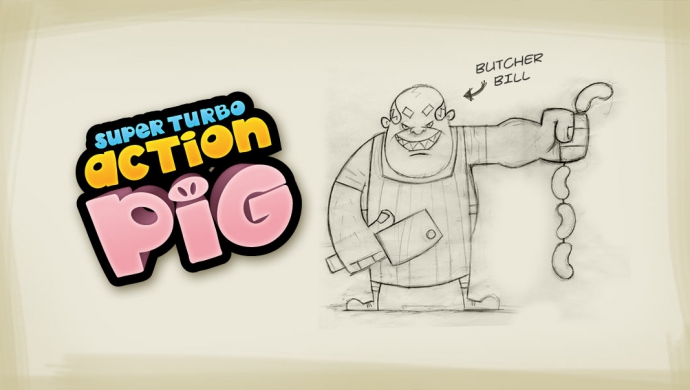
I was going to wait (as I usually do) until this guy was finished, but as so many people email in and ask to see my sketch work, I decided that this maybe the perfect time to show some.  So say hello to Butcher Bill and his massive meat cleaver!  This guy isn’t actually that nasty in the eye’s of us humans, but to Super Turbo Action Pig, he is the devil himself!  Butcher Bill has a fetish for sausage making, and with our Pink hero having such a fine physique, Bill will stop at nothing to turn him into his finest Cumberland sausages!

butcher-bill-super-turbo-action-pig

I’ll be posting the final artwork for Bill later this week/early next week.

Thanks.

Mike.

Categories: Concept Art,Fully Illustrated,Games,Sketch Work,Super Turbo Action Pig,The Joystick Generals,iPhone

FI-Faves...

fully-illustrated-time-donkey-fave

Time Donkey

This was another blast of a branding project for the guys over at Blurst, only this time, it was for their crazily entitled Time Donkey...awesome!

fully-illustrated-site-v3-fave-01

Digital Exploration

To celebrate the launch of Fully Illustrated V3.0 I wanted to create 3 individual pieces of digital art, focusing on the different stages of artistic creation. Yeah that's all a bit faffy isn't, I just wanted to make something pretty, here's image 1.

Twittering

Follow me on Twitter

Its full of NASTY throwbacks to the first movie, they even use the same lines, scenes the lot, its just BAD.